
Modern applications, from autonomous driving to fleet management to smart city planning, demand map data that is both rich in detail and efficient to deliver. This is exactly what NDS.Live map data standard is designed for.
NDS.Live is the cloud-native evolution of the Navigation Data Standard (NDS), the most widely adopted automotive map data standard in the industry. Its tile-based architecture lets consumers request precisely the data they need: the right geographic area, at the right level of detail, with only the map layers that matter for their use case. No bulk downloads, no wasted bandwidth – just targeted, on-demand access to high-quality map data.
The result is a platform that scales naturally whether you need lane-level geometry for a single intersection or road network data spanning an entire continent.
NDS.Live excels at efficient, structured delivery of map data, and the NDS Association provides dedicated tooling for analyzing and visualizing that data directly. However, in practice, many teams already have established workflows built around the broader geospatial ecosystem, including GIS platforms, web mapping libraries, spatial databases, and analytics pipelines. Rather than asking them to leave those workflows behind, GeoJSON allows them to bring NDS.Live data directly into the tools they already use.
Defined by RFC 7946, GeoJSON has become the lingua franca of the geospatial world. It is plain JSON — human-readable, version-control-friendly, and supported by virtually every tool in the ecosystem. From QGIS to PostGIS, from Leaflet to DuckDB Spatial — if a tool works with geodata, it supports GeoJSON. This ubiquity makes it a natural bridge format: it enables teams to visualize NDS.Live data, share it across departments, feed it into analytics pipelines, or combine it with other geospatial datasets — all without requiring specialized knowledge of the NDS.Live data model.
GeoJSON also makes NDS.Live services more transparent. Converting a service’s output to GeoJSON provides a quick and intuitive way to understand what kind of data a specific service covers, without requiring a deep dive into the specification.
The NDS.Live GeoJSON Converter bridges both worlds, combining the NDS.Live map data standard with the widely adopted GeoJSON format used across the geospatial ecosystem.
The GeoJSON Converter for map data is a lightweight service that exports NDS.Live as standard GeoJSON. It ships as a Docker container and exposes a simple REST API alongside an interactive web interface, no deep NDS.Live knowledge required to get started.
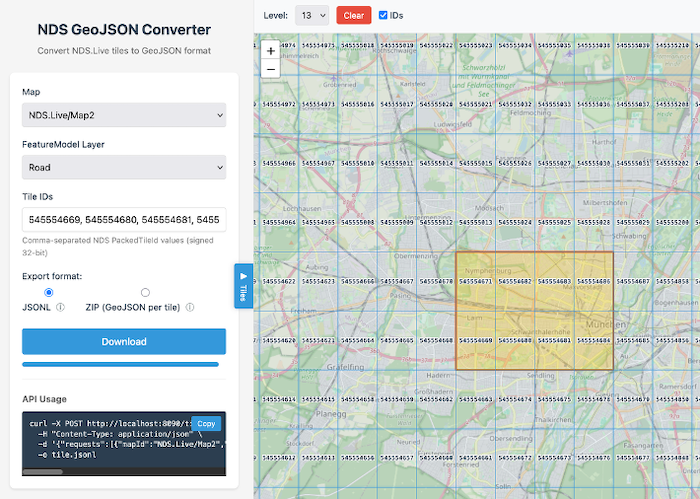
The core workflow is straightforward: specify which map, which layers, and which tiles you want — and get GeoJSON back.
POST /tiles
{
  "mapId":   "...",
  "layerId": "...",
  "tileIds": [...]
}

→ GeoJSON response
Requests can be batched — multiple maps and layers in a single call — and the service handles the conversion from NDS.Live tile identifiers to GeoJSON transparently.
Streaming (JSONL) — The default mode streams one GeoJSON FeatureCollection per line. This is ideal for data pipelines and large exports: responses start arriving immediately, memory usage stays constant regardless of dataset size, and processing can begin before the full export is complete.
ZIP — Produces a ZIP archive with one standard .geojson file per tile. This is the format you hand to a colleague, open in QGIS, or drop onto geojson.io for instant visualization.
For ad-hoc exploration, the built-in web interface provides an interactive map where users can visually select tiles, choose map layers, and trigger exports directly from the browser — no API knowledge needed. Useful for QA, debugging, or simply getting a quick look at what a particular area contains.
Not sure which tiles cover your area of interest? The converter includes endpoints for translating geographic coordinates to tile identifiers and computing bounding boxes, making it easy to go from “I need data around these coordinates” to a specific tile export.
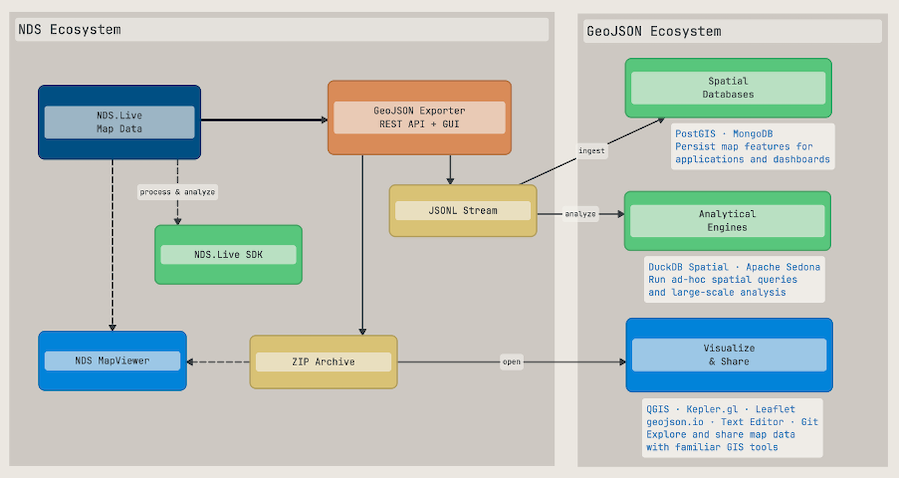
Once map data is exported as GeoJSON, the full open-source geospatial ecosystem is at your fingertips.
GeoJSON files are plain text. You can open them in any text editor, diff them in version control, or render them instantly on tools like geojson.io. Sharing becomes trivial: send a .geojson file or a ZIP archive — the recipient does not need any NDS-specific tooling to work with the data.
Load exported files into GIS tools like QGIS for overlay with satellite imagery, or render them in web mapping libraries like Leaflet, Mapbox GL, or Kepler.gl for interactive exploration.
For analytical workloads, GeoJSON integrates naturally with spatial databases. A typical setup could look like this:
NDS.Live → GeoJSON Exporter (JSONL stream) → Spatial Database → AnalysisAs a specific example, imagine you have exported road data and want to analyze speed limits — say, finding all road segments in a region where the speed limit exceeds 50 km/h. Each exported GeoJSON feature carries its NDS.Live attributes, including properties like speedLimitKmh, making this kind of filtering straightforward.
PostGIS (PostgreSQL with spatial extensions) is the established choice for server-based spatial analysis. Import the exported GeoJSON, then combine spatial and attribute queries in standard SQL.
-- Pseudo: import exported GeoJSON into PostGIS
stream_from(exporter, "/tiles", jsonl)
  | for_each_feature(feature)
  | insert_into("road_segments",
      feature.geometry,
      feature.properties.speedLimitKmh,
      feature.properties.functionalRoadClass)

-- Find high-speed road segments within an area of interest
SELECT geometry, speed_limit_kmh, functional_road_class
FROM road_segments
WHERE speed_limit_kmh > 50
  AND ST_Intersects(geometry, target_area);

-- Aggregate: total road length by speed limit
SELECT speed_limit_kmh,
       COUNT(*) AS segment_count,
       SUM(ST_Length(geometry::geography)) AS total_length_m
FROM road_segments
GROUP BY speed_limit_kmh
ORDER BY speed_limit_kmh;
DuckDB Spatial is a compelling alternative for analytical queries. It runs in-process with no server setup, reads GeoJSON files directly, and handles analytical workloads efficiently.
-- Pseudo: query exported GeoJSON files directly with DuckDB
SELECT geometry,
       properties.speedLimitKmh AS speed_limit,
       properties.functionalRoadClass AS road_class
FROM read_json('exported_tiles/*.geojson')
WHERE properties.speedLimitKmh > 50;

-- Distribution of speed limits across exported tiles
SELECT properties.speedLimitKmh AS speed_limit,
       COUNT(*) AS segment_count
FROM read_json('exported_tiles/*.geojson')
WHERE properties.speedLimitKmh IS NOT NULL
GROUP BY speed_limit
ORDER BY speed_limit;
MongoDB with its native GeoJSON storage and 2dsphere indexes is a natural fit for persisting exported features in application backends. For large-scale distributed analysis, Apache Sedona extends Spark and Flink with spatial operations — useful when combining NDS.Live exports with other geospatial datasets for cross-referencing, e.g. correlating speed limits with traffic incident data or urban planning zones.
The streaming JSONL export mode is particularly well suited for these database ingestion workflows: data flows directly from the exporter into the database without intermediate files, keeping the pipeline simple and memory-efficient, even for large-scale exports.
Visit nds.live for an overview of the NDS.Live platform, or head directly to the NDS.Live Developer Portal to explore the documentation, try the APIs, and start using NDS.Live with GeoJSON support today.
Back to news →