
Developers should be able to work with binary map data without proprietary tools or complex workflows. The NDS.Live Python SDK brings NDS.Live data and services into a familiar Python environment to read, write, and debug using high-level wrapper APIs for rapid development, or work directly with NDS.Live schema types when you need full control. Built on proven open-source foundations, it offers map creators, application developers, and tool builders a productive path from experimentation to validated solutions.

The NDS.Live Python SDK is a collection of Python packages organized as a namespace package ecosystem. Rather than a single monolithic library, it provides specialized modules that developers can use individually or combine as needed, ranging from feature prototyping and map analysis to building development tools and generating test data.
At its foundation, the SDK builds on proven open-source technologies:
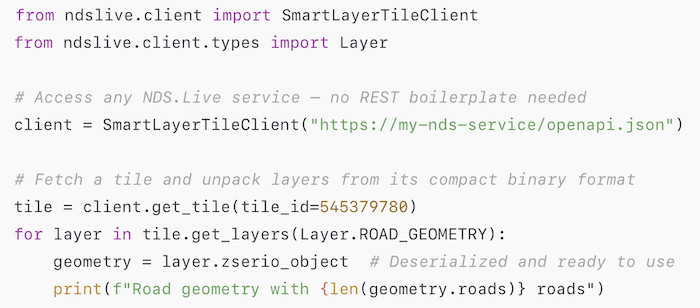
The NDS.Live Python SDK is designed to support a wide range of development tasks commonly encountered in navigation and mapping projects. It combines performance-oriented data access with developer-friendly packages, allowing developers to work efficiently with standardized map data.
ndslive.schema — Python bindings for NDS.Live
Auto-generated Python bindings for all NDS.Live schema modules provide strongly typed access to the complete NDS.Live data model. The package also includes utilities for schema discovery, type introspection, and custom layer management, making it straightforward to work programmatically with structures such as NDS.Live SmartLayer tiles.
ndslive.math — Coordinates and tile mathematics
A lightweight library that provides the mathematical foundations for working with the NDS.Live hierarchical tiling system:
ndslive.yaml — Map data authoring and conversion
A versatile package that enables bidirectional translation between human-readable YAML and NDS.Live binary formats. It supports both SmartLayer tile generation and Registry filestore creation, with automatic mode detection that simplifies everyday workflows. As a result, it is ideal for creating test fixtures, validating data pipelines, and learning the NDS.Live data model hands-on.
Developers can use the included ndslive-yaml CLI to build NDS.Live map samples from YAML definitions, convert binary tiles back into inspectable YAML, scaffold new project structures, and generate editable metadata from existing tiles. Its round-trip support between YAML and binary formats allows data to be authored, reviewed, and version-controlled in a readable text form before being compiled into efficient binary representations.
ndslive.client — Data access and exploration
A typed Python API with wrapper objects for accessing NDS.Live SmartLayer tile data from local filestores, directory-based sources, or remote HTTP services. The client automatically detects the data source type and schema version, providing a consistent interface regardless of where the data resides.
The package also includes the ndslive-client CLI, an interactive REPL-style shell for exploring NDS.Live services. With tab completion, command history, and familiar shell-style commands (ls, cd, fetch) developers can browse map data and service metadata, fetch tiles by ID, coordinates, or bounding boxes, and inspect tile contents using a built-in YAML viewer with search and filtering capabilities. Multiple services can be cached locally for offline access, with all cached data stored in a human-readable YAML format.
ndslive.server — Local tile serving
A FastAPI-based HTTP server that exposes NDS.Live SmartLayer tile data through a REST API fully compatible with the NDS.Live service specification. It can serve data from local directories, SQLite filestores, or proxy remote services, making it well suited for local testing, demonstrations, and integration scenarios.
The ndslive-server CLI provides YAML- and JSON-based configuration, daemon mode for background operation, and status monitoring for health checks. Client applications behave consistently whether interacting with the local server or a remote NDS.Live service, enabling seamless transitions from development to production. For example, a navigation team can run integration tests against a local server serving synthetic data and then switch to production endpoints with a single URL change.
The NDS.Live Python SDK gives map developers a practical, standards-based toolkit for working with NDS.Live data. From strongly typed Python APIs and interactive CLI tools to YAML-based data authoring, it supports the full spectrum of workflows, from rapid prototyping to in-depth map analysis, all within a familiar Python environment.
The NDS.Live Python SDK is available through the NDS.Live Developer Portal. Both members and non-members of the NDS Association can register for free to access the SDK, documentation, and sample data.
The Developer Portal provides comprehensive documentation, setup instructions, tutorials, and API references to guide developers from onboarding to hands-on experimentation.
To get started, create your free account at the NDS.Live Developer Portal (signup.nds.live) and explore the SDK documentation at https://developer.nds.live/python-sdk. You can fetch your first tile in seconds.
Back to news →